The Juntos Seguros community safety map is the platform’s most-used featurem a live, interactive map that shows real-time ICE activity, reported checkpoints, safe zones, and enforcement patterns across the United States. Unlike generic map apps, the juntosseguros map was built exclusively for immigrant families and shows exactly the information that matters most for daily safety decisions.
This guide covers everything you need to know: what the map shows, how to read every marker, how to use it on your phone, and which cities are currently covered on the Juntos Seguros map USA.
What Is the Juntos Seguros Community Safety Map?
The Juntos Seguros community safety map is a real-time, community-powered map that displays immigration enforcement activity across the United States. Every marker on the map represents a verified report submitted by a Juntos Seguros user, cross-checked for accuracy and published within minutes of confirmation.
The map updates continuously. When you open juntosseguros or the app and view the safety map, you are seeing the most current, verified information available from communities across the country, not outdated data, not unverified rumors, and not generic crime statistics that have nothing to do with immigrant safety.
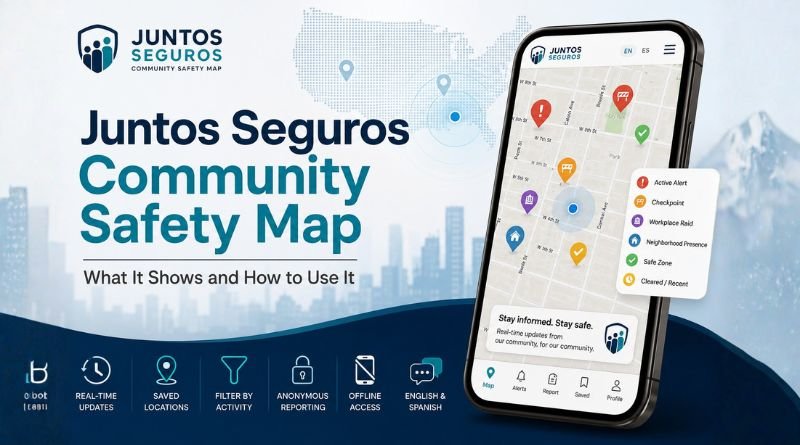
Map Marker Types, What Each Pin Means
Active Alert
ICE activity confirmed and currently ongoing in this area
Safe Zone
No reported activity, area confirmed clear by community
Cleared / Recent
Activity reported within 24 hrs but now resolved or cleared
Checkpoint
Immigration checkpoint reported at a specific road or location
Workplace Raid
Enforcement activity reported at a specific workplace
Neighborhood Presence
ICE vehicles or agents reported in a residential area
What Does the Juntos Seguros Safety Map Show?
The Juntos Seguros safety map displays six categories of verified safety information:
- Active ICE alerts — ongoing enforcement operations confirmed by multiple community reports
- Immigration checkpoints — road stops and transportation checkpoints with exact location pins
- Workplace enforcement activity — raids or presence at specific worksites
- Neighborhood ICE presence — agents or vehicles reported in residential streets
- Safe zones — areas with no reported activity, updated in real time
- Cleared reports — recent activity that has been resolved, kept visible for 24 hours for reference
Every piece of information on the juntos seguros map goes through verification before it appears. The platform does not publish unconfirmed tips. This is what separates the juntosseguros map from social media posts or group chats, accuracy is built into the system, not left to chance.
Key Features of the Juntos Seguros Map
Real-Time Updates
The map refreshes continuously. New verified reports appear within minutes. Active alerts update their status automatically as conditions change.
Saved Location Alerts
Save your home, workplace, and school. The map highlights activity near your saved locations first and sends push alerts when something is reported nearby.
Filter by Activity Type
Filter the map to show only checkpoints, only workplace raids, or only neighborhood presence — so you see exactly what is relevant to your route.
English & Spanish
Every label, alert, and status message on the map is available in both English and Spanish. Switch languages at any time without losing any functionality.
Offline Mode
The Juntos Seguros app caches the most recent map data so you can access your area’s last known safety status even without an active internet connection.
Anonymous Reporting
Every report you submit is fully anonymized. Your name, account, and location history are never attached to any published map marker.
How to Use the Juntos Seguros Community Safety Map — Step by Step
Using the juntosseguros map takes less than two minutes to set up. Here is the complete process:
1. Go to juntosseguros.io or open the app
The community safety map is accessible from the homepage of the website and as the main screen of the Juntos Seguros mobile app. No login is required to view the map, but a free account gives you saved locations and push alerts.
2. Allow location access
Grant the platform permission to use your current location so the map centers automatically on your area. Your location is used only to display relevant alerts, it is not stored or shared.
3. Read the map markers
Red pins indicate active alerts. Green areas are confirmed safe zones. Yellow markers are cleared reports from the past 24 hours. Tap any pin to see the full alert details, location, type, time reported, and current status.
4. Save your key locations
Add your home address, workplace, and your children’s school to your profile. The map will highlight any activity near these locations automatically and send push notifications when something is reported nearby.
5. Use filters to focus your view
If you commute a specific route, use the activity type filter to show only checkpoints along roads and highways. This gives you a clear, focused view without unrelated reports cluttering the map.
6. Submit reports to help others
If you witness ICE activity, tap “Report” on the map, select the activity type, confirm the location, and submit. Your report is anonymous and will be reviewed for verification before appearing on the community safety map.
Tip: Check the Juntos Seguros community safety map every morning before leaving home — especially before school drop-offs and commutes. It takes less than 30 seconds and gives you a clear picture of current activity in your area.
Juntos Seguros Map USA — Cities and States Covered
The juntos seguros map usa currently has active community coverage across major immigrant population centers in the United States. Coverage is strongest in cities with large, active user communities, and it grows every week as more users join and contribute reports.
| State | Cities with Active Coverage |
|---|---|
| California | Los Angeles, San Francisco, San Diego, Fresno, Bakersfield, San Jose, Sacramento |
| Texas | Houston, Dallas, San Antonio, Austin, El Paso, Fort Worth, McAllen |
| Florida | Miami, Orlando, Tampa, Jacksonville, Fort Lauderdale, Hialeah |
| New York | New York City (all 5 boroughs), Buffalo, Rochester, Yonkers |
| Arizona | Phoenix, Tucson, Mesa, Chandler, Tempe |
| New Jersey | Newark, Jersey City, Paterson, Elizabeth |
| Illinois | Chicago, Aurora, Elgin, Waukegan |
| Nevada | Las Vegas, Reno, North Las Vegas |
| Georgia | Atlanta, Marietta, Gainesville |
| North Carolina | Charlotte, Raleigh, Durham, Greensboro |
| Virginia | Northern Virginia, Richmond, Arlington |
| Washington | Seattle, Tacoma, Yakima |
Don’t see your city? The Juntos Seguros map expands through community participation. Every new user who joins and submits reports adds coverage to their area. If your city is not yet active, your first report starts the coverage, and others in your area will benefit immediately.
How to Report Activity on the Community Safety Map
The juntos seguros community safety map is only as strong as the community behind it. Reporting takes less than one minute and your identity is never attached to any submission:
- Open the map on juntosseguros.io or the app
- Tap the “Report” button — it appears as a prominent button on the map screen
- Select the activity type — checkpoint, workplace raid, neighborhood presence, or other
- Confirm the location — the map will use your current location or you can pin the exact spot manually
- Add any relevant details — number of vehicles, direction of travel, or anything else that helps other users
- Submit — your report enters the verification queue and, if confirmed, goes live on the community safety map within minutes
Frequently Asked Questions
What is the Juntos Seguros community safety map?
The Juntos Seguros community safety map is a live, interactive map that shows verified ICE activity, immigration checkpoints, safe zones, and enforcement presence across the United States. It is updated in real time by verified community members and is available at juntosseguros.io and on the mobile app in English and Spanish.
How do I access the Juntos Seguros map?
Go to juntosseguros.io on any device or download the free Juntos Seguros app on Android or iOS. The community safety map is the main feature on the home screen. No login is required to view the map, but creating a free account lets you save locations and receive push alerts.
Is the Juntos Seguros mapa available in Spanish?
Yes. The full map, every marker, alert label, status message, and control, is available in Spanish. Both English and Spanish are fully supported native experiences on the platform. Switch languages at any time from the settings menu.
How accurate is the Juntos Seguros safety map?
Every report on the Juntos Seguros safety map is verified through a multi-step process before it is published. Reports that cannot be confirmed are not added to the map. This verification system is what makes juntosseguros map reliable, only confirmed, accurate information reaches users.
What cities does the Juntos Seguros map USA cover?
The juntos seguros map usa currently covers major cities across California, Texas, Florida, New York, Arizona, New Jersey, Illinois, Nevada, Georgia, North Carolina, Virginia, and Washington state. Coverage expands continuously as more community members join and submit reports.
Can I report activity on the community safety map?
Yes. Any verified Juntos Seguros user can submit a report directly from the map. Reports are fully anonymous, your identity is never attached to any published marker. Tap the Report button on the map, select the activity type, confirm the location, and submit.
Does the Juntos Seguros map work offline?
The Juntos Seguros mobile app caches recent map data so you can view your area’s last known safety status without an active internet connection. For live updates and real-time alerts, a connection is required.