Within Juntos Seguros ICE refers to the category used for community reports related to immigration enforcement activity. It helps organize these reports so they can be viewed on a map instead of being shared only through private chats or social media posts.
The purpose of this section is to make information easier to find and understand. Users can explore reports by location, review available details, and follow updates from one place without switching between multiple sources.
What Information Can You Find?
The ICE section combines reports, locations, and updates into a single view. Rather than presenting long text conversations, the platform organizes information in a format that is easier to read and navigate.
Interactive Map
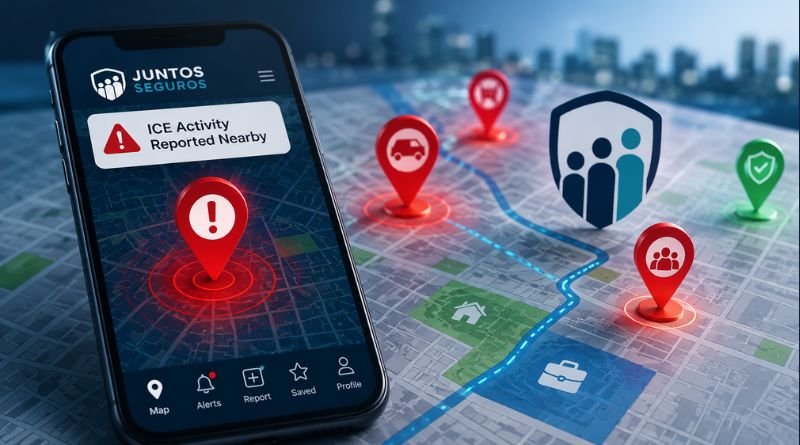
The juntos seguros ice map displays locations where community reports have been submitted. Selecting a marker opens the information attached to that report, allowing users to review the available details without searching through multiple messages.
The map can be explored by moving between different areas or searching for a specific location.
Community Reports
Reports are submitted by members of the community through the platform. Each report may include information such as the location, the time it was submitted, and any additional details provided by the person creating the report.
Because reports are community generated, users should always read the available information carefully before making decisions based on a single report.
Notifications
Users who enable notifications can receive updates when new reports become available for the locations they follow. Notification preferences can be changed at any time from the account settings.
How the Map Works
The map is the central feature of this section because it allows information to be understood visually instead of through long conversations.
Location Markers
Every report is represented by a marker placed on the map. Selecting that marker opens the available information associated with the report.
Report Details
Depending on the information submitted, a report may include:
- Location
- Time of submission
- Description
- Additional notes
The amount of information can vary from one report to another.
Finding Information
Users can zoom in, zoom out, or search different areas to explore reports that are relevant to them. This makes it easier to review information without scrolling through multiple discussion groups.
Accessing the Official Website
If you are looking for the juntos seguros ice website, always use the official Juntos Seguros platform instead of third-party websites that may contain outdated or incomplete information.
From the website, users can:
- Open the community map.
- Browse available reports.
- Learn more about platform features.
- Access additional community resources.
- Sign in or create an account when required.
Using the official website helps ensure that you are viewing the latest version of the platform and its available features.
How to View Reports on the Map
Opening the map is the quickest way to see available community reports. Each marker represents a location where information has been shared. Selecting a marker opens the details attached to that report.
Depending on what was submitted, you may see the location, the time the report was added, and a short description. Some reports contain only basic information, while others include additional context provided by the person who submitted them.
If you are checking reports for a specific city or neighborhood, use the search option instead of manually browsing the entire map.
How to Submit a Report
The platform also allows community members to contribute information. If you want to submit a report, use the reporting option available on the website or app.
Before submitting anything, make sure the information is based on what you personally observed. Avoid copying posts from social media or forwarding unverified claims from messaging groups.
A useful report should include:
- The location.
- The time of the observation.
- A short and clear description.
- Any details that help explain the situation.
Keeping reports accurate makes the platform more useful for everyone.
Understanding Community Reports
Every report represents information shared by a community member. Because situations can change quickly, reports should be treated as informational updates rather than permanent records.
Before relying on any report, it is a good idea to:
- Check when it was submitted.
- Read the description carefully.
- Look for newer updates if available.
- Compare information with trusted sources when appropriate.
This approach helps users understand the context instead of relying on a single update.
Juntos Seguros ICE Map
The juntos seguros ice map is designed to organize reports visually. Instead of scrolling through long conversations, users can explore locations directly on the map and open reports individually.
For people following updates in a particular area, the map provides a faster way to review available information without searching multiple websites or community groups.
Website and Mobile Access
The juntos seguros ice website can be accessed from any modern web browser. Depending on your device, you may also be able to use the platform on mobile for a similar experience.
Whether you access it from a phone, tablet, or computer, the interface is designed to make reports, maps, and community resources easy to navigate.
Best Practices When Using Community Information
Community reports can be helpful for understanding what has been shared in a particular area, but they should always be reviewed carefully. Reading the report details, checking when the information was submitted, and looking for newer updates can provide better context.
When using community-based information:
- Read the complete report instead of only the title.
- Check the time it was submitted.
- Avoid sharing information that you cannot verify.
- Use official sources whenever you need legal or government guidance.
- Report incorrect or outdated information if the platform provides that option.
These simple practices help improve the quality of information available to everyone using the platform.
Frequently Asked Questions
What is Juntos Seguros ICE?
Juntos Seguros ICE is a section of the Juntos Seguros platform that organizes community-submitted reports related to immigration enforcement activity. Instead of searching through different social media posts or messaging groups, users can view available reports and explore them on an interactive map.
How do I access the Juntos Seguros ICE map?
Open the official Juntos Seguros website and navigate to the map section. The map displays community reports as location markers. Selecting a marker opens the information available for that report, including the location and any details shared by the contributor.
Can I submit a report?
Yes. Registered users can submit reports through the platform. When sharing information, include only details you personally observed and avoid posting rumors or unverified claims. Accurate reports help keep community information useful and reliable.
Is there an official Juntos Seguros ICE website?
Yes. If you are looking for the juntos seguros ice website, always use the official Juntos Seguros platform. This helps ensure you are viewing the latest features, maps, and community resources instead of outdated information from third-party websites.
Does the platform work on mobile devices?
Yes. The platform can be accessed from modern mobile browsers, and supported mobile features may also be available depending on your device. The interface is designed to provide access to reports, maps, and other resources on both desktop and mobile.
What is the difference between the map and community reports?
Community reports contain the information submitted by users, while the map organizes those reports by location. This makes it easier to browse information visually instead of reading long conversations or searching through multiple sources.
Conclusion
The ICE section brings together community reports, location-based information, and interactive mapping in one place. Instead of relying on scattered conversations across different platforms, users can browse reports, explore locations, and access updates through a single interface.
Whether you want to understand how the map works, submit a report, or access the juntos seguros com ice experience through the official website, the platform is designed to make community information easier to organize and navigate. Using reports responsibly and reviewing available details before taking action helps create a more informed experience for everyone.